
一、父组件使用ref模板调用子组件方法的问题
1. 问题表象
父组件使用ref调用子组件的方法时,在dev模式正常运行,无任何报错。在build后生产环境运行时,提示子组件方法找不到。
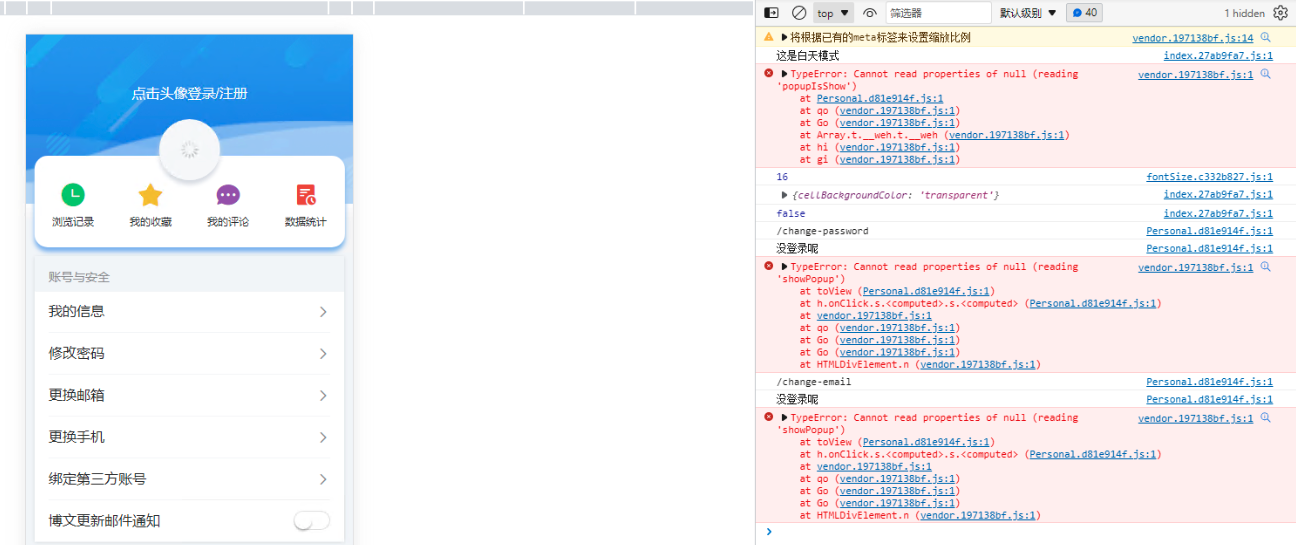
2. 场景复现
- 父组件代码
<template>
……
</template>

<script setup>
import Tabbar from "@/components/common/Tabbar.vue";
import LoginPopup from "@/components/common/LoginPopup.vue";
import {computed, onMounted, reactive, ref} from "vue";


// 引入公共方法
let {refLoginPopup} = global()

// 引入系统与设置模块
let {……} = setting(……)

// 公共方法
function global() {
  ……
  // 提示登录组件对象
  const refLoginPopup = ref(null)
  ……
  return {
    refLoginPopup
  }
}

function setting(……) {
  ……
  return {……}
}
</script>
<style scoped lang="scss">
……
</style>
- 子组件代码
<template>
  <van-popup v-model:show="popupIsShow">
    <section>
      <div class="tip-img">
        <img :src="'/src/assets/images/login-popup.png'" alt=""/>
      </div>
      <div class="tip-content">
        <h3>您还没有登录</h3>
        <p>请先登录或注册再进行此操作</p>
      </div>
      <div class="tip-btn">
        <van-button color="linear-gradient(to right, #ffb061, #ff795d)" round
                    @click="toLogin">立即登录
        </van-button>
        <p @click="toRegister">还未注册?</p>
      </div>
    </section>
  </van-popup>
</template>

<script setup>
import {Popup, Button} from 'vant';
import {ref} from "vue";
import {useRouter} from "vue-router";


const router = useRouter()
// 默认不显示登录提示弹窗
const popupIsShow = ref(false);
// 显示登录提示弹窗
const showPopup = () => {
  popupIsShow.value = true;
};
……
defineExpose({
  showPopup, popupIsShow
})
</script>

<style lang="scss" scoped>
……
</style>
3. 问题分析
由于该页面功能模块较多,为便于开发,按功能模块拆分到了不同的函数中,但定义ref模板时,也将其放在单独的函数中,导致vite打包时不能识别正常打包。
4. 解决办法
父组件定义ref模板时,一定要放在