
虽然vuejs的极大程度的减少了对dom的操作,定义了prop 和事件,但有时你可能仍然需要直接访问 JavaScript 中的子组件。此时可使用ref为子组件或 HTML 元素指定引用 ID。接下来通过几个简单的示例,演示如果使用vue3.2的script setup语法糖进行模板引用。
一、ref简单使用
获取模板内button元素,并在控制台打印。
1. 示例代码
<template>
  <button ref="button">这是一个按钮</button>
</template>
<script setup>
import {ref, onMounted} from 'vue'

const button = ref(null)
onMounted(() => {
  // DOM元素将在初始渲染后分配给ref
  console.log(button.value)
})
</script>

<style scoped lang="scss">
</style>
2. 执行结果

二、父组件获取子组件变量
1. 父组件(Test.vue)
<template>
  <div>
    <Demo ref="child"></Demo>
    <br/>
    父组件获取到子组件数据——>{{ childValue }}
    <br/>
    <button @click="getChildValue">获取子组件数据</button>
  </div>
</template>

<script setup>
import {ref} from "vue";
import Demo from "@/components/Demo.vue";
const child = ref(null);
const childValue = ref()
const getChildValue = () => {
  childValue.value = child.value.count
};
</script>

<style scoped>

</style>
2. 子组件(Demo.vue)
<template>
  <div>子组件计数:{{ count }}</div>
</template>

<script setup>
import {ref} from "vue";
const count = ref(10);
defineExpose({
  count
})
</script>

<style scoped>

</style>
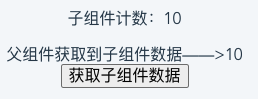
3. 执行结果
4. 注意事项
- 因为是调用组件的变量和方法。因此要给组件添加ref,而不是外层的html标签。
- 使用