es常用命令
1. 获取当前索引信息
GET /_cat/indices?v
- 该命令用于获取当前集群中所有索引的详细信息,包括索引名称、状态、文档数量、存储大小等。
2. 获取当前安装的插件
GET /_cat/plugins?v
- 该命令用于列出当前 Elasticsearch 集群中安装的所有插件及其版本信息。
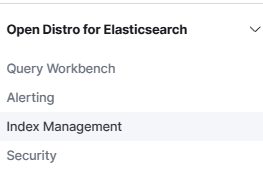
3. 检查 ISM 策略是否存在
GET _opendistro/_ism/policies
- 该命令用于获取当前所有的索引状态管理(ISM)策略。
4. 删除指定的 ISM 策略
DELETE _opendistro/_ism/policies/sae-logs-policy
- 该命令用于删除名为
sae-logs-policy 的 ISM 策略。
5. 创建 ISM 策略
PUT _opendistro/_ism/policies/sae-logs-policy
{
  "policy": {
    "description": "sae-开头日志的 ISM 策略,保留7天",
    "default_state": "hot",
    "states": [
      {
        "name": "hot",
        "actions": [
          {
            "rollover": {
              "min_size": "50gb",
              "min_index_age": "1d"
            }
          }
        ],
        "transitions": [
          {
            "state_name": "delete",
            "conditions": {
              "min_index_age": "7d"
            }
          }
        ]
      },
      {
        "name": "delete",
        "actions": [
          {
            "delete": {}
          }
        ],
        "transitions": []
      }
    ]
  }
}
- 该命令用于创建一个名为
sae-logs-policy 的 ISM 策略。该策略定义了两个状态:
hot 状态:索引在创建后 1 天或达到 50GB 时触发 rollover 操作,并在 7 天后过渡到 delete 状态。delete 状态:删除索引。
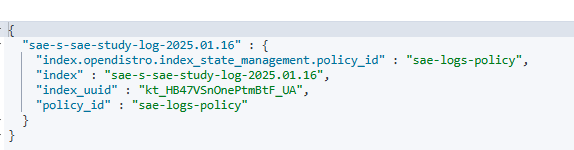
10. 获取指定索引的 ISM 策略执行情况
GET _opendistro/_ism/explain/sae-s-sae-study-log-2025.01.16
- 该命令用于获取指定索引
sae-s-sae-study-log-2025.01.16 的 ISM 策略执行情况的详细信息。
6. 删除所有以 sae- 开头的 ISM 策略
DELETE _opendistro/_ism/policies/sae-*
- 该命令用于删除所有以
sae- 开头的 ISM 策略。
7. 获取索引模板
GET _index_template
8. 创建索引模板
PUT _index_template/sae-logs-policy
{
  "index_patterns": ["sae-*"],
  "template": {
    "settings": {
      "number_of_shards": 3,
      "number_of_replicas": 1,
      "refresh_interval": "30s",
      "translog.durability": "async",
      "translog.sync_interval": "5s",
      "opendistro.index_state_management.policy_id": "sae-logs-policy"
    },
    "mappings": {
      "dynamic": true,
      "properties": {
        "@timestamp": { "type": "date" },
        "message": { "type": "text" },
        "loglevel": { "type": "keyword" },
        "pid": { "type": "integer" },
        "thread": { "type": "keyword" },
        "logger": { "type": "keyword" },
        "linenumber": { "type": "integer" },
        "project": { "type": "keyword" },
        "rizhi_ip": { "type": "ip" }
      }
    }
  }
}
- 该命令用于创建一个名为
sae-logs-policy 的索引模板,匹配所有以 sae- 开头的索引。模板定义了索引的设置和映射。
9. 删除索引模板
DELETE _index_template/s-sae-management-template
- 该命令用于删除名为
s-sae-management-template 的索引模板。
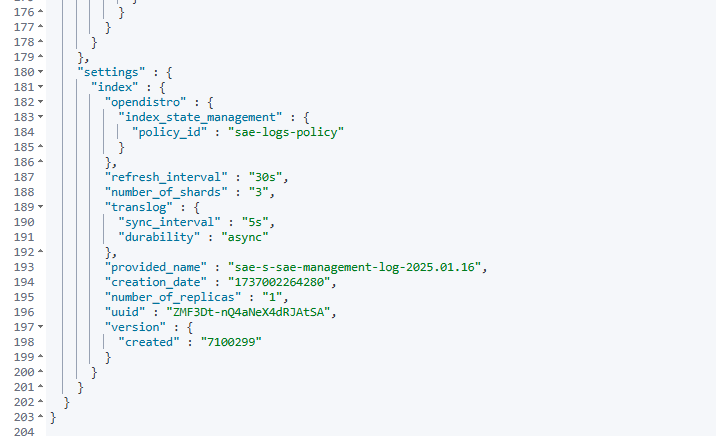
11. 查看索引是否应用了模板
GET /sae-s-sae-management-log-2025.01.16
- 该命令用于获取索引
sae-s-sae-management-log-2025.01.16 的详细信息,以检查是否应用了模板。
12. 删除指定索引
DELETE /sae-s-sae-study-log-2025.01.16
DELETE /s-sae-study-log-2025.01.16
DELETE /s-sae-management-logs-2025.01.15
DELETE /s-sae-study-logs-2025.01.14
DELETE java-service-logs-%25%7Bservice%7D-2025.01.15